Introducing Subscenarios: Smarter, faster, interconnected workflows

Automation is the key to unlocking growth – but managing a vast web of complex scenarios can quickly become a heavy burden for you and your team.
At Make, we’ve been working to change that with a solution designed to help you build seamless, interconnected automation systems – eliminating the tendency to create inefficient, standalone ‘one hit wonders’.
The result is Subscenarios – a fast, powerful way to connect, reuse, and debug scenarios – unlocking greater efficiency, accelerated growth, and endless possibilities.
Modular, reusable scenarios
To build modular, reusable scenarios, you need a way to pass data from one scenario to another.
Until now, the go-to solution was combining HTTP and webhooks or Make API.
However, in reality, that approach is clunky and frustrating. Duplicating the same set of modules and logic across multiple scenarios means that every update or change has to be manually applied everywhere it’s used.
Subscenarios change the game. Shifting any repeated logic into a subscenario allows you to create a single source of truth that’s easy to debug and maintain.
This way you can seamlessly pass data from one scenario to another while maintaining full visibility and control.
Set up in a few clicks

Example use cases
Here are a few ways customers are already using Subscenarios:
- Email sender. A single scenario handles all email sending, formatting, and storage, replacing the need for every scenario to duplicate this logic. Changes to email templates are now made in one place, saving time and effort.
- Customer data processing. Multiple scenarios call a single scenario to enhance and save customer data in a consistent format, streamlining processes across the board.
- Appointment making. Shared logic for appointment scheduling is now centralized in one scenario, simplifying maintenance and ensuring consistency.
Trace and track your connections
Subscenarios provide full visibility into your automation’s execution history for the first time, making it simple to identify and resolve errors quickly.
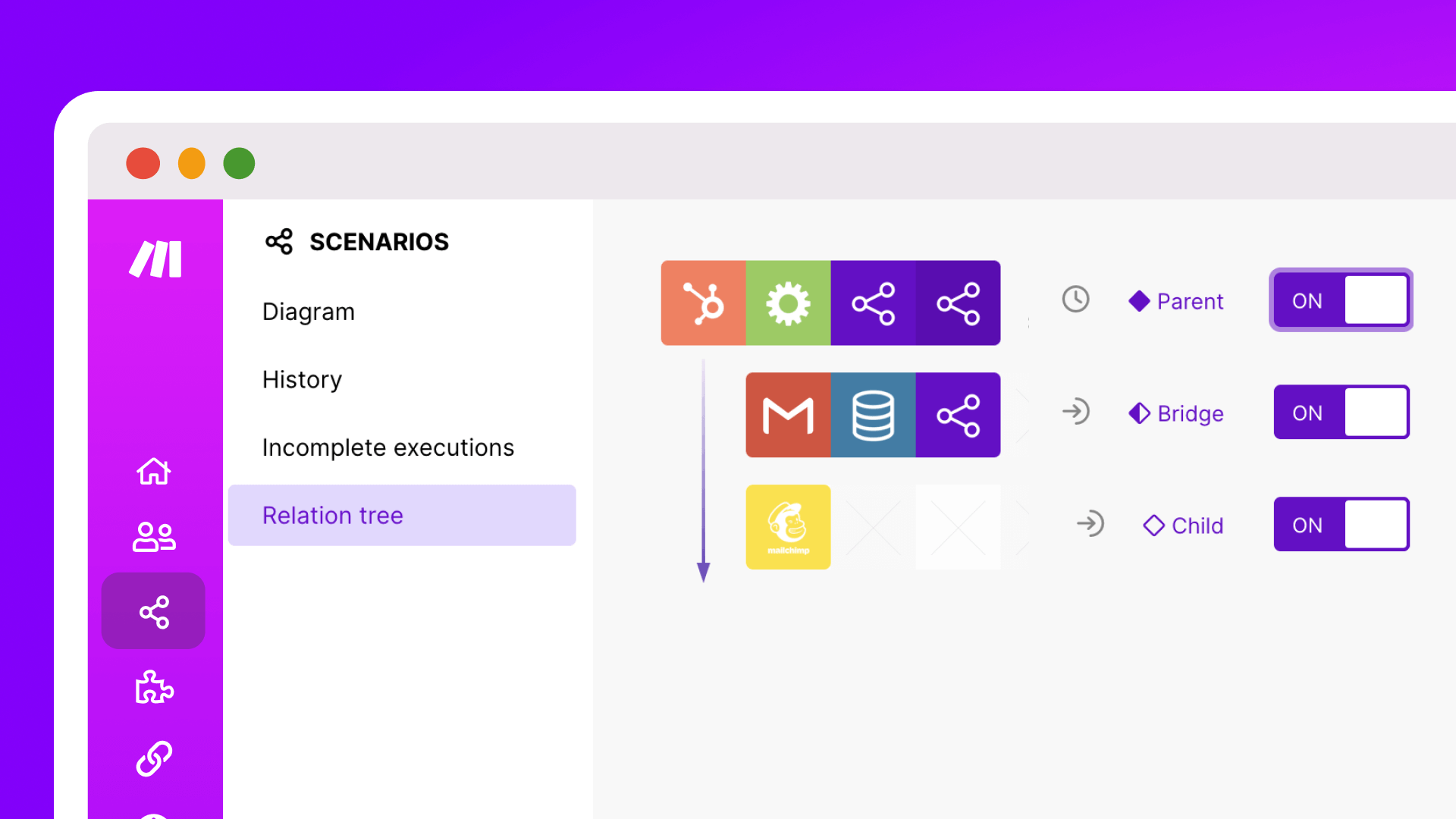
For Pro plans and above, Subscenarios offer an additional layer of insight with the Relation Tree.
This powerful feature lets you see how your scenarios are connected right from your scenario list – tracing relationships from the parent scenario (the trigger scenario) through the bridge scenario, and down to the child scenario.
With this clarity, you’ll be better equipped to manage and maintain complex workflows – giving yourself a solid foundation for growth.
Relation tree in action

Taking Notes
Proper documentation is key to managing and maintaining your scenarios – especially when a whole team or business is using the same automation. It’s essential to record the logic and configurations behind your scenarios, including formulas, webhooks, and HTTP call setups.
To enhance your documentation process, we’ve upgraded our Notes feature.
Sneak peek of new Notes

With the new and improved Notes, set to launch before the end of the year, you’ll have all your notes visible directly within the Scenario Editor. Plus, you’ll be able to link notes to one or multiple modules, search the content of all notes from the side panel, and make all documentation more organized and accessible.
Want more detail?
Watch my presentation from Waves '24, where I introduced Subscenarios (6 minutes and 25 seconds in).

Stay tuned for what’s next
We’re excited about the possibilities Subscenarios open up – but this is just the beginning.
We’re already working on introducing synchronous Subscenarios, allowing scenarios to wait or pause for outputs before letting the parent scenario finish. This means even more powerful and flexible automation is on the horizon.
Related blogs
Tool and strategies modern teams need to help their companies grow.

Inside Make
Make vs Zapier: Why users switch to Make
What are the differences between Make and Zapier that lead Zapier users to switch to Make’s AI automation? Learn how these platforms fare against each other.

Natalia Mrazova
April 30, 2026
Inside Make
Dear New User: 10 Tips to Get the Best Out of Make
Ready to build up your automation skills faster than ever with Make? Read our curated selection of tips to get there faster than ever.

Martin Etchegaray
August 9, 2022
Information Technology
New in Make: Introducing System and Custom Variables
With system and custom variables, you get control over your scenarios and error handling - plus the power to update your information and business logic across your organizations and teams in a few clicks.

Dean Maree
August 2, 2022
.png)




.svg)
.svg)
.svg)