Make vs Zapier: choosing the best tool for automation and AI
Selecting the right automation platform affects your organization's efficiency, growth potential, and ability to leverage AI. Make and Zapier take different approaches. This comparison examines the differences that matter most to businesses seeking value from automation and AI.


500,000+ companies have saved millions of hours with Make






Make vs Zapier
Features comparison
Make is a visual, powerful AI automation that's accessible to wider teams while accelerating results for technical ones. Zapier focuses on straightforward automation through a linear, step-by-step tool designed and priced for basic use cases.
Pricing
- Credit-based pricing
- Cost per credit lower than Zapier
- Free plan not time-limited
- All paid plans include AI app capabilities, Make AI Agents, and Make Grid
- Task-based pricing
- Cost per task higher than Make
- Free plan not time-limited but allows only two-step workflows
- AI agent and chatbot capabilities offered at additional cost
AI and agentic automation
- Make AI Agents available within workflows
- Limited capabilities unless purchased as separate features
Workflow orchestration
- Visual orchestration of multi-agent systems integral via Make Grid
- Zapier Canvas provides basic workflow explanation
User-friendliness
- Animated drag-and-drop Scenario Builder
- Real-time data flow visualization
- Maia builds from plain-language prompts, visually, in the Scenario Builder
- Intuitive interface suited for simple automations
- Requires separate step for basic data transformation
- Copilot builds Zaps from plain-language prompts
Integrations
- 3,500+ app integrations
- Roughly double the number of preset actions in most apps when compared to Zapier
- 8,000+ app integrations
- Limited customization per app integration
Access control and governance
- Custom Roles for precise, permission-level access control, assignable at org or team level
- Full audit log of every role creation, update, and assignment
- Fixed account roles only (Owner, Admin, Member) with folder-level sharing
- Account-wide audit log (6–12 months depending on plan)
Customization
- Flexibility to connect unlimited additional APIs
- JavaScript/Python usable via the Make Code app
- Custom functions available on Enterprise plans
- Automations rely on basic preset actions
- Code by Zapier offers some customizability
Security, compliance, and reliability
- SOC 3, SOC 2 Type II and ISO 27001 certified
- GDPR compliant
- SOC 2 Type II and ISO 27001 certified
- GDPR compliant
Support and community
- Professional support on all paid plans
- 24/7 priority support for Enterprise plan
- Make Academy with 36 courses
- Email support on all paid plans
- Premier support for Enterprise customers
- Zapier Academy with 12 courses
Leader in customer satisfaction
Join the satisfied customers who give us top ratings.

Capterra


4.8


4.7

G2
4.7
4.5

Getapp
4.8
4.7

Gartner
4.6
4.6
Pricing comparison
Make’s value at scale vs Zapier’s costly Professional plans
Make's credit-based model scales efficiently and comes with AI apps and Make AI Agents in every paid plan. Zapier's task-based packages rise rapidly in price when deploying workflows at scale; agentic AI features must be added at extra cost.
Make employs a credit-based pricing model as of November 2025. Each step ("module") that processes data in a workflow ("scenario") typically consumes at least one credit, though features that handle multiple data bundles or use AI may consume more.
This structure accounts for variable consumption: simpler workflows consume fewer credits, while complex workflows with many steps can be optimized to operate in bulk. Make's pricing tiers include a Free plan with 1,000 credits per month indefinitely, and paid plans starting at $9 for 10,000 credits monthly (Core). Users can purchase additional credits or upgrade at any time. Enterprise pricing is customized based on organizations' needs.
Importantly, all of Make's paid plans are fully equipped with Make AI Agents, Make Grid, and other AI features, and will include Maia by Make once launched. In other words, growing and household-name teams can both access nearly all of the same powerful AI features, with appropriate budgets for each.
Zapier charges based on tasks, where each action step in a workflow ("Zap") counts as one task. In this respect, Make and Zapier share very similar pricing models.
However, while Zapier’s pricing does offer a Free plan limited to 100 tasks per month and single-step Zaps, paid plans begin at $19.99 monthly for 750 tasks (Professional). This means that the price per task is significantly higher than Make's price per credit. This helps cement Zapier as a tool best suited to simpler, shorter automations.
In addition, basic paid plans lack the abilities to robustly use AI agents and chatbots in workflows. There are free, limited introductory tiers for both of these features, though full AI agents and chatbots are sold separately starting at $33.33 and $13.33 respectively. Thus even a starter pack fully equipped for agentic-first users may cost over 6 times more than Make's starter Core plan.
Pricing
Make
Zapier
Free
$0/mo
1,000 credits/mo
Free
$0/mo
100 tasks/mo
Core
$9/mo
Starting at 10,000 credits/mo
—
N/A
—
Pro
$16/mo
Starting at 10,000 credits/mo
Professional
$49/mo
Adjustable credits
Team
$29/mo
Starting at 10,000 credits/mo
Team
$69/mo
Adjustable credits
Enterprise
Custom pricing/mo
Enterprise
Custom pricing/mo
Enterprise plans
Make's unified platform vs Zapier's fragmented pricing
Make provides enterprise-grade infrastructure on one visual platform, with compliance certifications, 24/7 priority support, and dedicated value engineers included as standard. Zapier's AI capabilities (including Agents, Chatbots, and Copilot) remain separate, individually priced add-ons to their Enterprise plan.
Make operates as a mature, enterprise-ready SaaS platform designed for reliability and scale. The infrastructure runs across multiple zones within Amazon AWS environments for optimal flexibility.
Make's standard security measures include GDPR, SOC 2 Type II, and ISO 27001 compliance, plus AES-256 encryption for data at rest and TLS 1.2/1.3 for data in transit. Enterprise plans add company-wide single sign-on (SSO) via OAuth2 or SAML2, role-based access controls, and guaranteed 99.5% uptime with defined SLAs.
Enterprise customers receive 24/7 priority support with 2-hour response SLAs, on-premises agents for securely accessing local networks, custom functions for advanced logic, comprehensive audit logs, and dedicated value engineers for implementation guidance.
Make's architecture supports sophisticated use cases: complex multi-step workflows, high-volume data processing, and business-critical automations that require reliability. Organizations report successfully deploying Make for mission-critical operations where downtime would significantly impact business operations.
Zapier offers enterprise features through its Enterprise plan, including SSO authentication, advanced admin controls, Premier support, custom data retention policies, and activity logs.
The platform maintains SOC 2 Type II and ISO 27001 certifications and complies with GDPR and other privacy regulations. Zapier's infrastructure is built on AWS and Google Cloud Platform, providing geographic redundancy and reliability.
However, Zapier is fundamentally positioned as an entry-level automation tool. Several limitations affect enterprise suitability, such as error handling capabilities are less sophisticated than platforms designed for complex automations and the lack of robust orchestration features. This makes managing large-scale automation landscapes challenging.
Users report that Zapier works well for personal automation and simple cross-app workflows, but organizations often need to migrate to more powerful platforms as their automation needs grow. The linear workflow model that makes Zapier accessible also limits its ability to handle the complex, interconnected processes that characterize enterprise operations.
Enterprise Plans
Make
Zapier
Building by prompt
Maia by Make vs Zapier’s Copilot
Make provides AI capabilities throughout the automation journey. All major AI providers – OpenAI, Google AI, Anthropic Claude, Microsoft Azure AI, and Make's own AI toolkit – are among Make's 3,000+ pre-built apps. These modules can handle tasks like text analysis, image recognition, content generation, and sentiment analysis without custom code.
Make AI Agents are autonomous digital colleagues capable of decision-making and tool use. Users can provide Agents with context by simply uploading files – no need to build custom retrieval-augmented generation (RAG) workflows with vector databases. The latest generation of Make AI Agents are designed to be as visual and intuitive as every other part of Make. A core focus is that agents are built, run, and debugged inside the scenario builder. This means that users can create agents that interpret input, choose the right tools and adapt within workflows.
Make Grid provides visual orchestration capabilities specifically designed for complex multi-agent automation landscapes. Maia by Make, launching early 2026, will enable users to build agentic workflows through natural conversation, further simplifying AI automation.
Zapier AI integrates AI capabilities into workflows through pre-built modules for major AI providers. Users can add AI steps to Zaps for tasks like text generation, data extraction, and content summarization.
With Zapier Agents, users can create AI agents that can handle complex tasks autonomously; Zapier Copilot can help build and maintain these with natural language. However, users report challenges orchestrating multiple agents or building complex AI-driven processes. It's also worth noting that users must purchase an additional package in order to access the full Zapier Agents experience – they are not included in basic subscription plans.
Zapier's MCP support allows agents to connect to tools and services through Model Context Protocol, though setup requires more manual configuration compared to Make's pre-configured MCP server integrations.
AI & agentic automation
Make
Zapier


%201.svg)
+2
Date
·
Duration
Make
Maia
Maia builds automations and AI Agents from plain language, directly in the visual Scenario Builder, showing every step in real time and asking clarifying questions, so you stay in control throughout. Included on all plans.
.avif)

+2
Date
·
Duration
Zapier
Copilot
Copilot builds Zaps from plain-language prompts, with checkpoint version control to review and roll back AI-suggested changes. Included on all plans.
User-friendliness
Make’s visual workflows vs Zapier’s linear simplicity
Make emphasizes visual design with drag-and-drop building, real-time data flow animations, and features that accelerate building for broader business teams. Zapier's step-by-step interface is geared toward straightforward automations but becomes limiting as complexity builds.
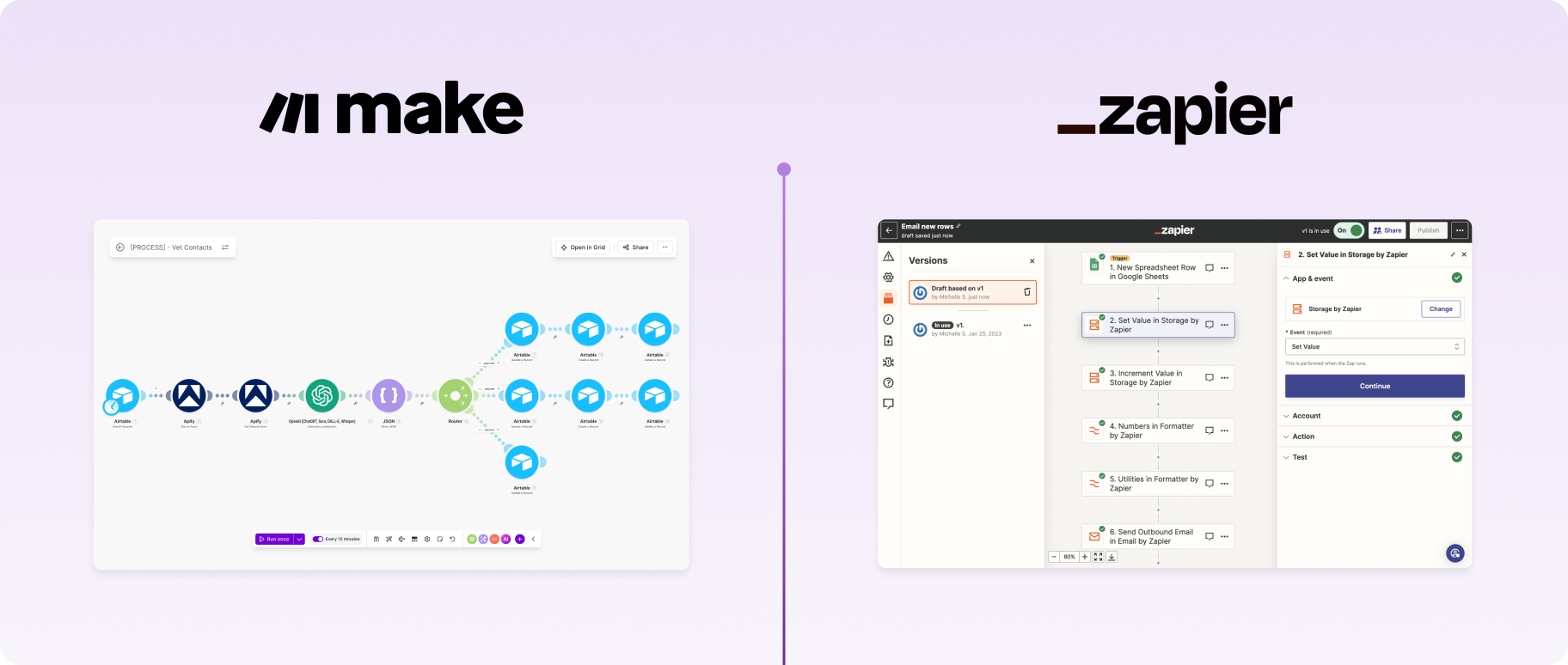
Make's visual-first design makes automation accessible while maintaining power. The drag-and-drop Scenario Builder allows users to connect modules representing actions, with animations illustrating how data flows through workflows. This immediate visual feedback helps users understand what their automation does.
The interface includes features that reduce complexity: streamlined authentication where users sign into services without understanding OAuth flows; Scenario Sharing for easily importing proven workflows; and Scenario Run Replay for re-running workflows using historical data to identify errors.
For users needing custom logic, the platform provides no-code and low-code options for conditional logic, loops, and data transformations. This approach serves beginners while accelerating output for advanced users.
Make Grid also enables users to manage complex workflows more easily by allowing users to visualise the complexity of the real world. On the other hand, Zapier users struggle to manage their workflows as they become complex - for example when they feature multiple branches within multiple branches.
However, Make's power can mean a longer learning curve for less technical users compared to more basic tools. Users report that understanding concepts like data structures, routers, and error handling takes time. Make Academy provides 36 interactive courses to support this learning journey.
Zapier's interface is consistently praised for simplicity and ease of use. The step-by-step builder guides users through creating automations: select a trigger app and event, connect to an action app, map data fields, and activate the Zap.
This linear approach minimizes cognitive load and allows users to create functional automations within minutes of signing up. The interface abstracts away technical complexity – users don't need to understand webhooks, API calls, or data structures to build basic workflows.
Zapier's extensive template library provides pre-built automations for common use cases, further reducing setup time. The AI-powered Zap creator helps users describe what they want to automate in plain language and suggests appropriate workflows.
However, this simplicity becomes a limitation for complex use cases. Users building workflows with multiple conditional branches, data iteration and aggregation, or advanced data transformations often find Zapier's linear model restrictive. The platform prioritizes accessibility over flexibility, making it ideal for straightforward automations but less suitable for sophisticated automation requirements.
User-friendliness
Make
Zapier
Workflow orchestration
Automatic visual maps with Make Grid vs Zapier's manual canvas
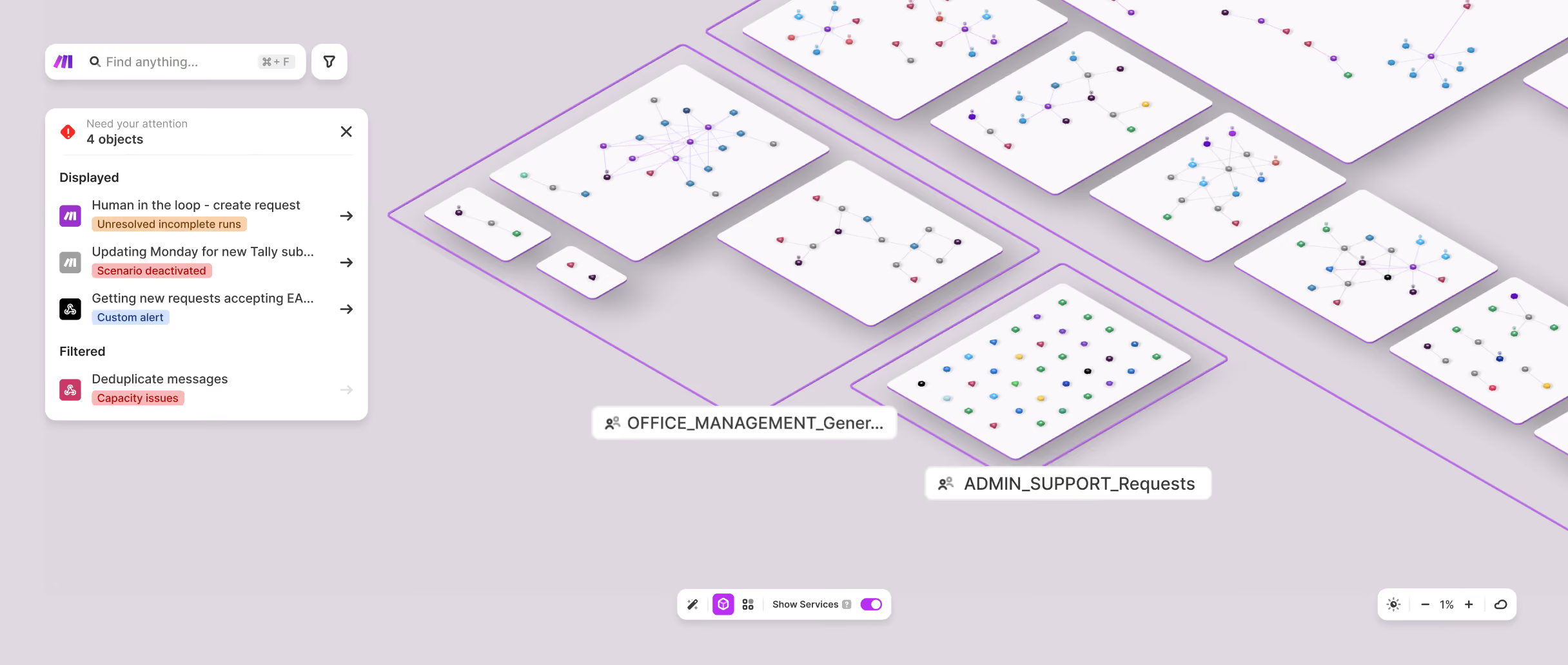
Make Grid automatically generates real-time visual maps of entire automation landscapes. Zapier Canvas requires teams to maintain and update their canvases themselves.
Make Grid, included in all paid plans, automatically generates real-time maps to illustrate relationships between workflows, data flows, and dependencies. With Grid, standalone and reused AI automations, agents, subscenarios, and even alerts are depicted in a way that is instantly shareable with and understandable by colleagues of varying technical skill levels.
The interface displays scenarios as islands populated with colored icons, groups related automations by team or function, and illustrates data flows and dependencies in real-time. This visibility enables quick identification of bottlenecks, simplifies troubleshooting across complex environments, and facilitates knowledge sharing across teams and companies.
For organizations managing dozens or hundreds of workflows and multiple AI agents, Make Grid saves hours of documentation time and reduces the risk of breaking dependencies when modifying workflows, allowing complex agentic systems to work faster, more flexibly, and more reliably.
Zapier Canvas provides a visual interface for building and documenting workflows. Users can create flowcharts showing how Zaps connect, add notes, and collaborate with team members on workflow design.
However, Canvas functions primarily as a planning and documentation tool rather than a live orchestration system. It doesn't automatically map existing workflows, show real-time data flows, or automatically discover dependencies between workflows. Users must manually create Canvas boards and update them as Zaps change, often relying on clear, written explanations to supplement the limited visual representations.
Organizations wishing to manage and reuse assets across sophisticated, interconnected multi-agent systems find Canvas insufficient for orchestration needs.
Workflow orchestration
Make
Zapier
+2
Date
·
Duration
Make
Visual agents
Make Grid automatically generates real-time visual maps of your entire automation landscape, showing relationships, dependencies, and agents, with zero manual setup and included in every paid plan.
+2
Date
·
Duration
Zapier
Conversational setup
Zapier Canvas includes AI-assisted mapping; however requires teams to actively build and maintain their own canvases rather than generating a live map on its own.
Support and community
Make’s comprehensive resources vs Zapier’s forum-based assistance
Make provides professional support on all paid plans, structured learning resources through Make Academy, and an active community of 45,000+ members. Zapier offers email support across paid plans with a large user community generating significant third-party content.

Make provides a comprehensive support system that scales with subscription level. Official support through a ticketing system is included on all paid plans. Enterprise customers benefit from 24/7 priority support with two-hour SLAs, plus dedicated account management and one-on-one consulting with Make value engineers.
Additional resources available to all users at no extra cost include:
- Make Community forum with 45,000+ registered members and approximately 4,200 active monthly users
- Make Academy with 36 interactive courses across five learning paths, covering foundational concepts to advanced agentic automation
- 7,900+ pre-built scenario templates for common use cases
- Help Center with documentation, setup walkthroughs, and best practices
- Regularly updated blog with feature explanations, use cases, and real-world examplesOver 500 solution partners are trained and certified by Make to provide expert consulting services. The user base of 350,000+ users generates significant third-party content including YouTube tutorials, guides, and inspiration.
Zapier provides email support on all paid plans, with faster response times for higher tiers. Enterprise customers receive Premier Support with priority handling and dedicated success managers. The platform offers extensive documentation including:
- Help Center with guides for common use cases and troubleshooting
- App-specific integration guides
- Video tutorials and webinars
- Blog with automation tips and use casesZapier's large user base generates substantial third-party content. The Zapier Community Forum connects users for questions and advice. The platform's template library includes thousands of pre-built Zaps for common workflows.
However, some users report slower response times for support inquiries on lower-tier plans. The community forum, while active, can be inconsistent in response quality compared to professional support. Organizations requiring guaranteed support response times need Enterprise plans, which represent a significant cost increase.
Zapier's extensive user base means most common issues have been documented somewhere, making self-service problem-solving feasible for straightforward challenges. For complex technical issues, however, the lack of professional support on lower tiers can be frustrating.
Support and community
Make
Zapier
Integrations
Make’s customizability vs Zapier’s sheer size
Make offers over 3,000 pre-built applications maintained by Make to certified security standards. This integration ("app") library covers popular platforms like Salesforce, HubSpot, and Google Workspace, while Enterprise plans open up access to key apps like NetSuite and specialized tools.
A key differentiator is the depth of integration: Make provides more pre-existing actions per app. Whereas Zapier might offer 10–15 for a given app, Make often provides 30 or more, enabling more sophisticated automations while maintaining the accessibility of no-code. Each integration also comes with streamlined authentication – users typically just click "Create Connection" and sign into the service.Users who want to go deeper can employ HTTP modules – available on all plans – to connect to custom APIs that don't have pre-built integrations. The Code app on paid plans supports custom Python and JavaScript, while Enterprise plans can access Custom Functions for advanced data manipulation that can be applied inline. These options give more technical teams the power to incorporate any system with an API while still being sped along by Make's visual workflow interface.
Zapier maintains the largest integration library among automation platforms with over 8,000 apps. This breadth of coverage means most mainstream business software has a Zapier integration, from accounting tools like QuickBooks to project management platforms like Asana to communication tools like Discord.
Zapier's integration strength lies in covering the long tail of applications – if a tool has an API, there's a good chance Zapier has integrated it. For organizations requiring simple automations across popular tools, this broad coverage provides value. However, teams building complex workflows often encounter limitations in what each integration can accomplish.
The "Webhooks by Zapier" feature does allow connections to custom APIs to address this, though many users report that this customization is required too often, as many integrations are missing key functionalities.
Integrations
Make
Zapier
+2
Date
·
Duration
Make
3,500+
Make provides 3,500+ pre-built apps with deep functionality and flexibility per app, plus custom API connections, code, and custom apps on paid plans.
+2
Date
·
Duration
Zapier
8,000+
Zapier Canvas includes AI-assisted mapping; however requires teams to actively Zapier offers 8,000+ integrations with limited actions and flexibility per app and as a result less functionality for customization. and maintain their own canvases rather than generating a live map on its own.
Making the choice
Choosing between Make and Zapier means getting to the core of your organization's attitude toward AI automation: Are you aiming to streamline a handful of chores, or do you want to make AI automation a core driver of your business?
For teams seeking no-frills automations, Zapier's simplicity and broad integration library can seem attractive. Make, however, provides superior value for organizations with the ambition to fully leverage mature, complex AI automation across the business. Make balances accessibility with power, providing the right tools for broader business units and tech-savvy power users alike to put AI and automation to work. What’s more, Make’s pricing delivers greater value as your ambitions grow with transparent pricing and economies of scale.
Make helps teams innovate faster, while staying in control. For organizations serious about automation and AI as a strategic capability, Make is the strongest choice.
- Connect 3,000+ native apps across your stack
- Reduce manual work by a factor of 5
- 50% fewer manual processes in under 6 months
- Critical process automation with 24/7 support
.png)


Support
FAQs
Can’t find the answer you’re looking for? Please chat to our team.
Which platform is better for business users starting out with automation?
Zapier's step-by-step interface is genuinely beginner-friendly, and for very simple, single-step automations it's a strong starting point.
That said, most business users quickly outgrow basic automations. Make's visual Scenario Builder is designed to make complexity manageable from the start – you can see exactly how data flows through your workflows, which builds understanding faster than a linear, abstracted interface.
Make Academy's interactive courses also mean that the learning curve, while real, is well-supported. And because Make's pricing starts lower, experimenting and building confidence doesn't have to cost more.
If you're starting out with a view to scaling – automating more processes, incorporating AI, or connecting complex systems – Make gives you room to grow without switching platforms later.
Which tool is better for AI?
Both platforms connect to major AI providers – OpenAI, Google AI, Anthropic Claude, and others – allowing you to add AI steps to your automated workflows.
Where Make pulls ahead is depth and accessibility. Make AI Agents are built, run, and debugged directly inside the Scenario Builder, giving you full visibility into how your agents behave and interact with other workflows. Make Grid then maps your entire automation landscape – including agents – in real time, making complex multi-agent systems manageable at scale.
Zapier offers AI agent functionality, but full access requires purchasing a separate package on top of your base subscription. Make includes AI Agents and Make Grid on all paid plans.
For teams serious about agentic automation, Make's integrated, visual-first approach offers more power, transparency, and value from the outset.
Can I migrate workflows from Zapier to Make?
Yes. Migrating from Zapier to Make is a manageable process. There's no automated import tool, so you'll recreate your Zaps as Make scenarios manually – but most users find it more straightforward than expected. A key adjustment is terminology. Zapier's "Zaps" become "scenarios" in Make, "steps" become "modules", and "paths" become "routes". Familiarizing yourself with these terms first makes the transition noticeably faster. Make's Help Center glossary is a useful reference. From there, you build each scenario in the Scenario Builder, adding and connecting the modules that correspond to your existing Zap steps. Make's 7,900+ pre-built templates also cover many common use cases, so you may find ready-made starting points for workflows you've already built in Zapier.
Make Academy's learning resources are available throughout to support you at every stage.


.svg)
.svg)
.svg)