A tech influencer's guide to improving efficiency with Make

Ever wondered how automation could transform your daily tasks? Whether you're new to Make or are looking for more practical ways to enhance your workflows, this blog will give you exactly what you need: a real-world use case combined with a step-by-step platform tutorial.
Kevin Stratvert, a leading content creator and former Microsoft Product Manager and Windows MVP, put together an insightful video guide that shows the power of Make in action. Using a fictional business, Kevin shows how to set up a seamless workflow that cuts manual work from hours to seconds — saving time, reducing errors, and improving efficiency.
Here’s a sneak peek into the hypothetical story of Kevin Cookie Company and how Make simplified its order management process.
The challenge: Slow order process prone to errors
Kevin Cookie Company sells different types of cookies to its sweet-loving customers. The orders are submitted via Google Forms, which is fairly simple for the clients, but quite time-consuming for Kevin.
Without Make, he had to manually add the order information to a Google Sheets tracking document, send customers an order confirmation email, and forward a Microsoft Teams message to a fulfillment channel. Processing one order took only around 10 minutes, but make it 50 orders and you get over 8 hours – an entire working day. Kevin also occasionally forwarded incorrect information to the fulfillment team, resulting in shipping delays and angry customers.
The solution: Simple scenario for the order automation
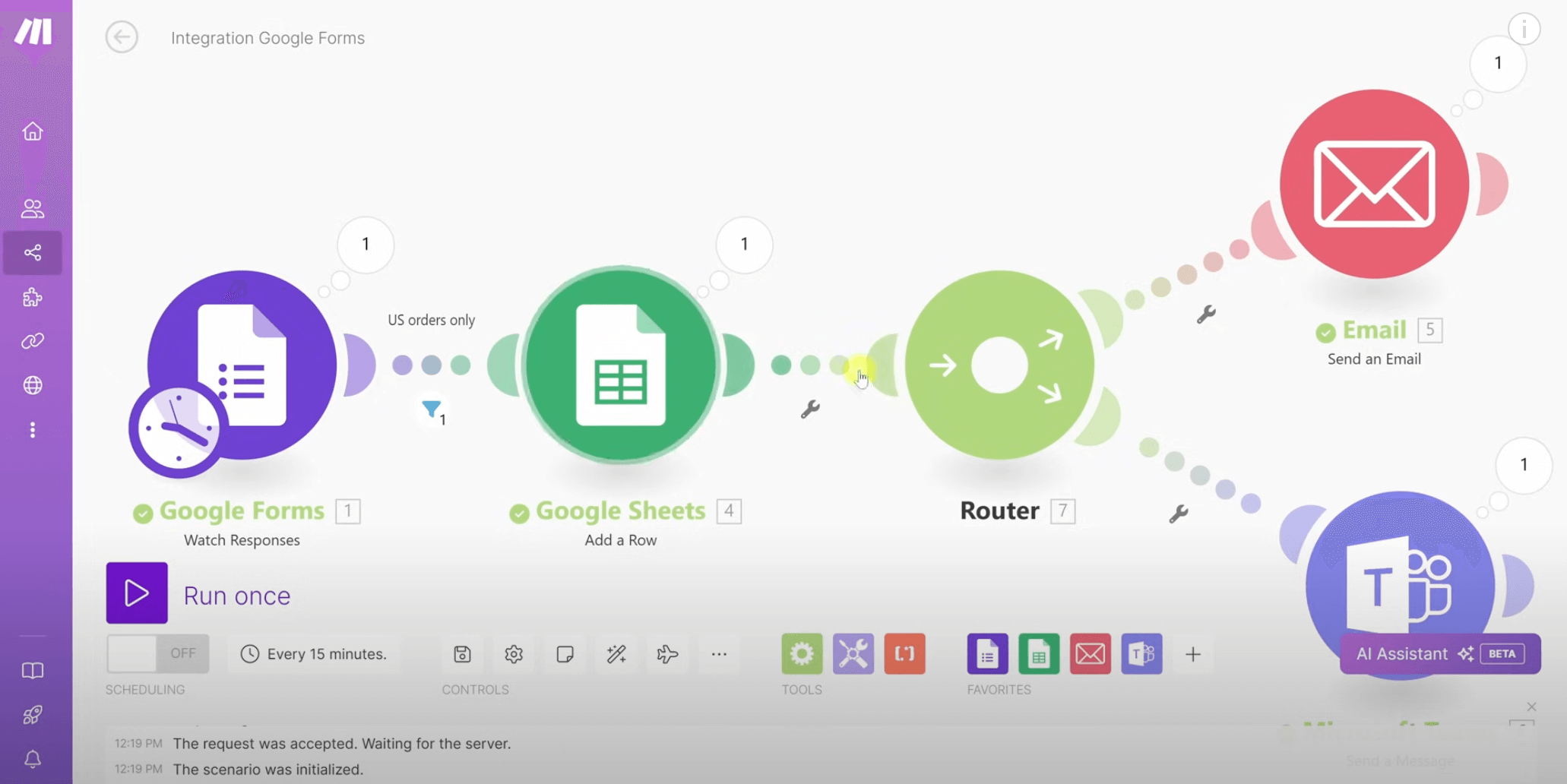
Kevin created a simple order processing workflow that eliminated human errors and saved him hours, cutting several minutes of work per order into something over a second:
- The initial Google Forms module pulls information from each order form and feeds it into Make’s repository. The scenario will use this data, like the customer’s email, name, shipping address, cookie types, and quantity, in the following steps.
- Next, the Google Forms module connects with the Google Sheets tracking document and feeds the extracted data into corresponding spreadsheet columns. Since Kevin’s company doesn’t ship abroad, the workflow also filters out all orders outside of the US.
- The step connects Google Sheets with an “Email” module, using uploaded data to automatically send an order confirmation email. To personalize Kevin’s generic email copy, Make’s dynamic values replace the name, cookie type, and quantity placeholders with real customer data.
- Lastly, the Google Sheets module is also connected to a Microsoft Teams module which sends an automatic message to the fulfillment team. Again, Make feeds the message with a custom name, cookie quantity, and cookie type.
The results
By setting up this simple automation, Kevin could:
- Cut the entire order management process from hours to minutes
- Eliminate threats of human error
- Remove potential shipment issues, ensuring customer satisfaction
Kevin’s top tips
To make sure you’ll use Make to its fullest potential, Kevin shares 3 main pieces of advice:
- Learn from Make’s ready-made templates. They’re a quick way to understand the fundamentals of how Make works. With a bit of luck, you can even find the exact workflow you need.
- Don’t stick to the basics. Explore the 2,000+ applications Make offers and see what can enrich your workflows.
- Since there’s little to no coding involved, you can also experiment with more advanced automation. For example, setting multiple steps and stages, using filters, aggregators, branched workflows, and more.
If Kevin’s story caught your attention, watch his video with a complete, detailed walk-through. By the end of it, you'll have a solid understanding of how to leverage Make to automate your daily tasks, leaving you with more time to focus on what truly matters. Or, start using Make straight away!

Related blogs
Tool and strategies modern teams need to help their companies grow.

AI
What is AI automation? A complete guide for 2026
Most teams use AI but stay stuck in pilots. Here's how AI automation turns those pilots into production systems.

Raife Dowley
May 21, 2026

Inside Make
Make vs n8n: How to make the choice in 2025

Stuart Aitken
January 8, 2025

Inside Make
Make vs Zapier: Why users switch to Make
What are the differences between Make and Zapier that lead Zapier users to switch to Make’s AI automation? Learn how these platforms fare against each other.

Natalia Mrazova
April 30, 2026
.png)




.svg)
.svg)
.svg)